OAuthのライブラリとしてgtm-oauth2がありますが、ちょっと使って見たのでめもです。オフィシャルのドキュメントはこちら。
やりたいこととしてはOAuthの部分はgtm-oauth2を使ってAPIへのアクセスは自分でやるという方式です。APIへのアクセスまで含んだGoogle APIs Client Librariesというのも有るみたいですが使うのが面倒そうだったので(∀`*ゞ)
googleのAPIを叩きたいのでgoogleのAPIコンソールでプロジェクトの登録とかが終わっている前提です。
最初にgtm-oauth2のソースをsvnからチェックアウトします。(https://code.google.com/p/gtm-oauth2/source/checkout)
$ svn checkout http://gtm-oauth2.googlecode.com/svn/trunk/ gtm-oauth2-read-only
ソースを取得したら必要なファイルをプロジェクトに追加。必要なのは以下の9ファイル。
- Source/Touch/GTMOAuth2ViewControllerTouch.h
- Source/Touch/GTMOAuth2ViewControllerTouch.m
- Source/Touch/GTMOAuth2ViewTouch.xib
- Source/GTMOAuth2Authentication.h
- Source/GTMOAuth2Authentication.m
- Source/GTMOAuth2SignIn.h
- Source/GTMOAuth2SignIn.m
- HTTPFetcher/GTMHTTPFetcher.h
- HTTPFetcher/GTMHTTPFetcher.m

ARCが有効なプロジェクトの場合は追加した*.mファイルにコンパイルオプションとして-fno-objc-arcを付ける。

あとはother linker flagsに-ObjCを追加。
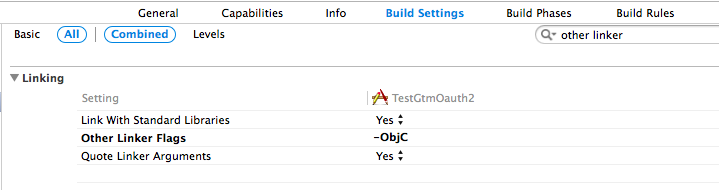
多分最小限なサンプルはこちら。
//
//  TSViewController.m
//  TestGtmOauth2

#import "TSViewController.h"

#import "GTMOAuth2Authentication.h"
#import "GTMOAuth2ViewControllerTouch.h"

@interface TSViewController ()

@property (nonatomic, retain) GTMOAuth2Authentication *auth;

-(void) startLogin;
@end

static NSString * const kKeychainItemName = @"foobar";
static NSString * const scope = @"使用するAPIのスコープのURL"; // https://www.googleapis.com/auth/tasks等
static NSString * const clientId = @"クライアントID";
static NSString * const clientSecret = @"クライアントシークレット";
static NSString * const hasLoggedIn = @"hasLoggedInKey";

@implementation TSViewController

- (void)viewDidLoad
{
    [super viewDidLoad];
	// Do any additional setup after loading the view, typically from a nib.
}

- (void)didReceiveMemoryWarning
{
    [super didReceiveMemoryWarning];
    // Dispose of any resources that can be recreated.
}

-(void) viewDidAppear:(BOOL)animated
{
    [self startLogin];
}

#pragma mark - gtm-auth2 -
-(void) startLogin
{
    NSUserDefaults *defaults = [NSUserDefaults standardUserDefaults];
    BOOL hasLoggedin = [defaults boolForKey:hasLoggedIn];

    if (hasLoggedin == YES) {
        self.auth = [GTMOAuth2ViewControllerTouch authForGoogleFromKeychainForName:kKeychainItemName
                                                                          clientID:clientId
                                                                      clientSecret:clientSecret];

        [self authorizeRequest];

    } else {

        GTMOAuth2ViewControllerTouch *viewController = [[GTMOAuth2ViewControllerTouch alloc] initWithScope:scope
                                                                                                  clientID:clientId
                                                                                              clientSecret:clientSecret
                                                                                          keychainItemName:kKeychainItemName
                                                                                                  delegate:self
                                                                                          finishedSelector:@selector(viewController:finishedWithAuth:error:)];

        [self presentViewController:viewController animated:YES completion:nil];
    }

}

-(void)viewController:(GTMOAuth2ViewControllerTouch *)viewController finishedWithAuth:(GTMOAuth2Authentication *)auth error:(NSError *)error
{
    if (error != nil) {
        // Authentication failed
    } else {
        // Authentication succeeded
        self.auth = auth;

        NSUserDefaults *defaults = [NSUserDefaults standardUserDefaults];
        [defaults setBool:YES forKey:hasLoggedIn];
        [defaults synchronize];

        [self authorizeRequest];

    }

    [viewController dismissViewControllerAnimated:YES completion:nil];
}

-(void) authorizeRequest
{
    NSLog(@"before");
    NSLog(@"%@", self.auth);

    NSMutableURLRequest *req = [[NSMutableURLRequest alloc] initWithURL:self.auth.tokenURL];
    [self.auth authorizeRequest:req completionHandler:^(NSError *error) {
        NSLog(@"after");
        NSLog(@"%@", self.auth);
    }];
}

@end
viewDidLoad()では何もしなくてviewDidAppear()で処理を行っているのはグーグルへのログイン用のviewを出すときにviewDidLoad()からの流れで実行しようとすると「Unbalanced calls to begin/end appearance transitions for~」と怒られるのでviewDidAppear()で行ってます。
で、startLogin()ですが、すでにグーグルへのログイン済みかをチェックしてログインしていたらログインビューは出さないような動きになってます。
-(void) startLogin
{
    NSUserDefaults *defaults = [NSUserDefaults standardUserDefaults];
    BOOL hasLoggedin = [defaults boolForKey:hasLoggedIn];

    if (hasLoggedin == YES) {
        self.auth = [GTMOAuth2ViewControllerTouch authForGoogleFromKeychainForName:kKeychainItemName
                                                                          clientID:clientId
                                                                      clientSecret:clientSecret];

        [self authorizeRequest];

    } else {

        GTMOAuth2ViewControllerTouch *viewController = [[GTMOAuth2ViewControllerTouch alloc] initWithScope:scope
                                                                                                  clientID:clientId
                                                                                              clientSecret:clientSecret
                                                                                          keychainItemName:kKeychainItemName
                                                                                                  delegate:self
                                                                                          finishedSelector:@selector(viewController:finishedWithAuth:error:)];

        [self presentViewController:viewController animated:YES completion:nil];
    }

}
ログイン済みだった場合は基本的なデータをキーチェインから取得します。使っているのはauthForGoogleFromKeychainForName()で引数にキーチェインのアイテム名、クライアントID、クライアントシークレットの3個です。データを取得したらアクセストークンの取得をauthorizeRequest()でしています。
ログイン済みで無かった場合はログイン画面のビュー(GTMOAuth2ViewControllerTouch)のインスタンスを作って表示します。インスタンスの初期化にはinitWithScope()を使っています。
スコープはURLで例えばカレンダーならここのScopeのところにあります。APIのリファレンスページを探せば見つかると思います。
clientID、clientSecretはそのままですね。keychainItemNameは先ほどのauthForGoogleFromKeychainForName()と同じものを使います。ログインに成功するとAPI側でアイテム名に
kKeychainItemNameを使ってセーブしてくれます。最後のviewController:finishedWithAuth:errorでログイン結果を受けとります。
このビューはこんな画面を表示します。

ログインに成功するとGTMOAuth2Authenticationのインスタンスを受け取れるのでどこかにコピーしておきます。ここではログインに成功したらアクセストークンの取得を行います。
-(void)viewController:(GTMOAuth2ViewControllerTouch *)viewController finishedWithAuth:(GTMOAuth2Authentication *)auth error:(NSError *)error
{
    if (error != nil) {
        // Authentication failed
    } else {
        // Authentication succeeded
        self.auth = auth;

        NSUserDefaults *defaults = [NSUserDefaults standardUserDefaults];
        [defaults setBool:YES forKey:hasLoggedIn];
        [defaults synchronize];

        [self authorizeRequest];

    }

    [viewController dismissViewControllerAnimated:YES completion:nil];
}アクセストークンの取得はGTMOAuth2AuthenticationクラスのauthorizeRequest()で行います。この関数の引数はURLオブジェクトですがgoogleのサービスを使う場合はself.auth.tokenURLを使うことができます。このオブジェクトに設定されているURLはhttps://accounts.google.com/o/oauth2/tokenです。
-(void) authorizeRequest
{
    NSLog(@"before");
    NSLog(@"%@", self.auth);

    NSMutableURLRequest *req = [[NSMutableURLRequest alloc] initWithURL:self.auth.tokenURL];
    [self.auth authorizeRequest:req completionHandler:^(NSError *error) {
        NSLog(@"after");
        NSLog(@"%@", self.auth);
    }];
}
このauthorizeRequest()の実行結果はこんな感じです。authorizeRequest実行前はリフレッシュトークンのみですが、実行後はアクセストークンも入ってます。
2013-11-24 15:53:04.061 TestGtmOauth2[66453:70b] before
2013-11-24 15:53:04.089 TestGtmOauth2[66453:70b] GTMOAuth2Authentication 0x8a232f0: {refreshToken="1/lf7BhzDxAYOe3m-1YHV5sKX3RnNtxwilFeANjV1-KB8"}
2013-11-24 15:53:04.614 TestGtmOauth2[66453:70b] after
2013-11-24 15:53:04.694 TestGtmOauth2[66453:70b] GTMOAuth2Authentication 0x8a232f0: {accessToken="ya29.1.AADtN_VzVlPhnV2a4FVu-e9fKfpB5tvIV9Cf8hTb29cgMP67p3smzRduNIeyyrd0rg2R_A", refreshToken="1/lf7BhzDxAYOe3m-1YHV5sKX3RnNtxwilFeANjV1-KB8", expirationDate="2013-11-24 07:53:04 +0000"}これで準備はOKでAPIを叩くことができるようになります。
APIを叩くときはヘッダにAuthorizationを付けて通信しないと401が返ってきます。ということでNSMutableURLRequestでヘッダーを付けます。
    NSString *token = [NSString stringWithFormat:@"OAuth %@", self.accessToken];

[req setValue:token forHTTPHeaderField:@"Authorization"];このNSMutableURLRequestオブジェクトをNSURLConnectionで使えばAPIの実行ができます。
